Merry Christmas. Know the five December scams before you send moneyLost money to fraud? Start here

MoneyGuard

Stop fraud before it hits your bank account.

MoneyGuard checks for risk before you open your banking app, and reimburses eligible fraud losses up to your Coverage Limit. Download it, see the prices, and learn every part of the app on this page.

Available now on Android. The iPhone version is planned for January to March 2027.

Scan with your Android phone's camera to go straight to the download.

Regulated financial protection. Backed by Linkage Assurance Plc, approved by NAICOM.

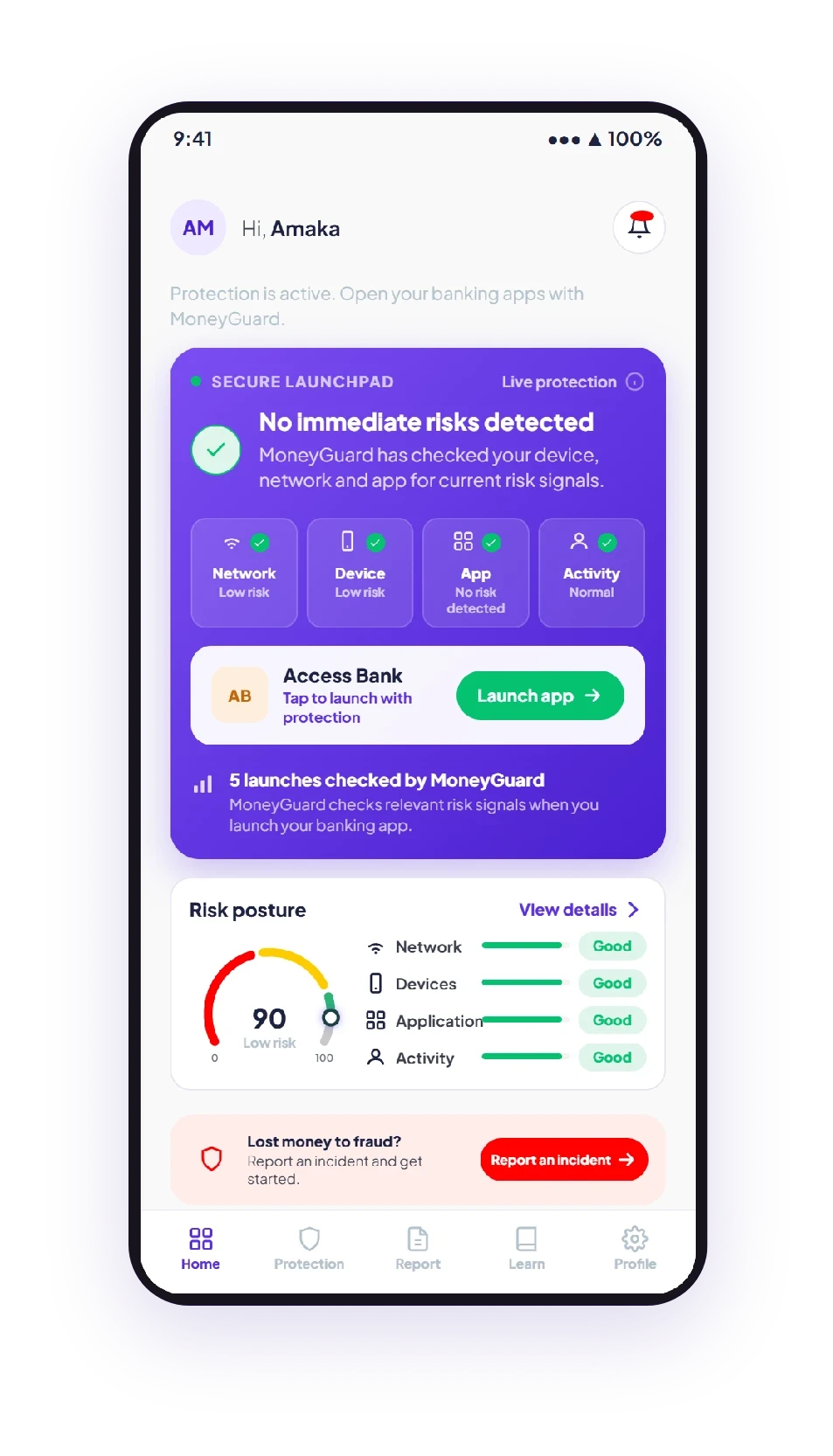
MoneyGuard Home screen: the Secure Launchpad shows no immediate risks, Access Bank ready to launch, and a risk score of 90
  • 48 hourstarget to know where you stand after a report
  • 7 daysfor eligible losses to be reimbursed
  • 4 checksevery time you launch your bank
  • ₦675a month when you pay annually for ₦500,000 cover

Target eligibility decisions within 48 hours for at least 80% of reported incidents. Reimbursement applies to fraud losses eligible under the applicable cover and is subject to cover limits, exclusions and policy terms. The seven-day period begins when the fraud incident is reported through the designated reporting channel.

One year of protection. Pay how you like.

Choose your Coverage Limit, then pay once or spread it across the year.

Prices for ₦500,000 cover

Monthly

₦900 / month

12 payments across the year

Total for the year₦10,800

QuarterlySave 10%

₦2,430 / quarter

4 payments, ₦810 a month

Total for the year₦9,720

AnnuallySave 25%

₦8,100 / year

1 payment, ₦675 a month

Total for the year₦8,100

Prices for ₦1,000,000 cover

Monthly

₦1,500 / month

12 payments across the year

Total for the year₦18,000

QuarterlySave 10%

₦4,050 / quarter

4 payments, ₦1,350 a month

Total for the year₦16,200

AnnuallySave 20%

₦14,400 / year

1 payment, ₦1,200 a month

Total for the year₦14,400

Instalments are fixed

MoneyGuard is an annual protection, so monthly and quarterly payments continue until your Coverage Year ends.

Auto-renewal is your choice

It decides whether a new Coverage Year starts after this one. You can turn it off on any payment option.

Coverage Limits available now: ₦500,000 and ₦1,000,000. ₦2,000,000 and ₦5,000,000 are coming soon. A deductible of 5% of each eligible claim applies, minimum ₦10,000. Pay by card, Bank Transfer or Pay with Link. There is no free trial.

The app guide, step by step

Pick a chapter. Each one matches a part of the app, with the screens you will see.

Chapter 01

Getting started

Setting up takes four stages: create your account, verify your identity, choose what to protect, then pay. After the four intro screens, tap Protect My Account to begin.

  1. On Sign Up, enter your full name, email address, phone number and a password with at least 8 characters, one number and one uppercase letter. A non-Nigerian phone number works for login, but you still need a Nigerian bank account and BVN.
  2. Tick both boxes: that you are 18 or older and accept the Terms of Service and Privacy Policy, and that you consent to MoneyGuard using your BVN and account information to verify you.
  3. Enter the 6-digit code sent to your email. You can request a new code after 2 minutes.
  4. Create a 6-digit PIN to log in and confirm actions, or tap I'll do this later and set it from Profile.
Sign up
Verify your email
Create your PIN

Chapter 02

Verify your identity with your BVN

MoneyGuard uses your BVN to confirm who you are and to find the bank accounts it can protect. Enter your BVN only inside the app, never in a chat, call or message.

  1. Enter your 11-digit BVN and tap Proceed.
  2. Enter the code sent to the phone number registered with your BVN.
  3. When you see Identity Verified, tap Set Up Protection.

Don't know your BVN? Dial *565*0# from the phone number registered with your bank. Can't get the code? Tap Can't access this number? on the BVN verification screen.

Enter your BVN
Enter the BVN code
Identity verified

Chapter 03

Set up your protection and pay

Five short steps, shown as "Step 1 of 5" at the top of each screen, then checkout.

  1. Select Bank: search for and choose the bank you want MoneyGuard to protect.
  2. Add Account: enter a 10-digit account number and tap Verify account. MoneyGuard checks it against your verified BVN. Tap + Add another account to protect more than one. Only the accounts you add are protected.
  3. Coverage Limit: the most MoneyGuard will reimburse per Coverage Year, shared across all your protected accounts.
  4. Payment: pay in one payment or in instalments, and set Auto-renewal on or off.
  5. Protection Summary: check your bank, accounts, limit, payment, auto-renewal and end date, then Proceed to Payment.
  6. At Checkout, pay by card (Visa, Mastercard or Verve), Bank Transfer, or Pay with Link to pay yourself or send the link to someone who can pay for you.

After you pay Allow notifications and location access when asked: MoneyGuard needs both to alert you and spot suspicious activity. Read your Protection Summary to the end, then tap OK, go to dashboard. If a payment fails, nothing is charged.

Select bank
Choose how to pay
Checkout

Chapter 04

Secure Launchpad

Always open your banking app from the Secure Launchpad on Home. MoneyGuard checks four areas each time Home loads, then shows the result.

Network
Whether your Wi-Fi or connection is secured
Device
Screen lock, rooting and your phone's software
App
Malware, spyware, fake apps and phishing sites
Activity
Whether your login details appear in known data breaches
  1. All clear: tap your bank to launch it with protection.
  2. Low risk, such as screen lock turned off: tap Fix Now to see the issue and go to the right phone setting. You can still launch your bank app.
  3. High risk, such as an unsecured network or a rooted phone: tap Fix Now and fix the issues before you bank.

Launching anyway affects your cover If you choose I understand. Launch anyway with a high risk unresolved, fraud losses from that banking session won't be eligible for reimbursement.

Low risk found
Fix Now
High risk found

Chapter 05

Your protected bank shortcut

Once setup is complete, MoneyGuard offers to add a protected shortcut for your bank to your phone's home screen. It works like the Secure Launchpad, without opening MoneyGuard first.

  1. When the option appears, add the shortcut. It shows your bank's app icon with a small MoneyGuard badge.
  2. Tap the shortcut whenever you want to bank. MoneyGuard shows MoneyGuard protection active while it checks your phone. Tap Cancel to stop.
  3. When the check finishes, MoneyGuard tells you how many issues it found, if any. Tap Open with your bank's name, or Fix issues first.

Make it your new bank icon Use the shortcut in place of your bank's usual app icon, so every banking session is checked.

The shortcut on your home screen
Checking your phone
Check finished

Chapter 06

Protection score and Learn

The Protection tab shows a score out of 100 and your current risk level: 80 to 100 is low, 46 to 79 medium, 0 to 45 high. It updates every time you launch a banking app, and completing Learn lessons also counts toward it. The score is a guide, not a guarantee against fraud.

Recognising phishing and impersonation scams
5 minutes, required
Spotting phishing links before you click
4 minutes, recommended
What to do if your phone is stolen
3 minutes, recommended
SIM swap awareness
4 minutes, optional
Protection tab
Learn tab
Home, scrolled down

Chapter 07

Report fraud and track your claim

If you lose money to fraud, report it as soon as you can. Contact your bank first if money may still be moving.

  1. Go to Report and tap Report an incident, or use Lost money to fraud? on Home.
  2. Choose the type of fraud: phishing, social engineering, account takeover, stolen credentials, device compromise, SIM swap, unauthorised transfer or payment, or other.
  3. Enter when it happened, the affected account and the amount lost, then explain what happened. Add screenshots of bank alerts, receipts or chat logs if you have them.
  4. Confirm the details are true and tap Submit Incident. Submitting a false report is fraud.
  5. Tap Track Claim to follow it through In Progress, Not Eligible, Approved and Reimbursed. For an approved claim, tap Reimburse my Account and choose one of your verified accounts. If a claim is not eligible, Claim details shows why, and you can appeal each claim once.

Your deductible You pay 5% of each eligible claim, minimum ₦10,000. The rest is reimbursed up to your Coverage Limit.

Report tab
Report an incident
Track your claims

Chapter 08

Alerts and what to do

MoneyGuard sends a push notification when something needs your attention, and every alert also appears under the bell icon on Home. MoneyGuard can't see inside your banking app: when a risk appears mid-session, it alerts you, but it can't confirm whether that session was affected.

Risk detected during your session
Tap it, then Fix Network Now. If anything looks unfamiliar in your bank app, contact your bank and change your password once you're on a secure network.
New device activity detected
If it wasn't you, change your password in Profile → Password & security and contact support straight away.
Your screen lock is not set
Set a screen lock in your phone's settings. MoneyGuard confirms once it's on.
Your policy document is ready
Download it from the alert, or from Your protection on Home.
Notifications
Session risk alert
Home

Chapter 09

Profile, payments and cancelling

Everything about your account, coverage and payments lives in the Profile tab.

Linked accounts
See protected accounts, and change accounts or your Coverage Limit. A higher limit is prorated for the time left in your Coverage Year. Changes are locked in the last 3 months of a Coverage Year.
Payment option, Auto-renewal and Payment method
Switch between monthly, quarterly and annual payment for this Coverage Year, turn auto-renewal on or off, and pay by card, Bank Transfer or Pay with Link.
Cancel policy
Your protection stays active until the end of your Coverage Year. There is no refund for payments already made, and monthly or quarterly instalments are still collected until the Coverage Year ends. Claims already submitted are still reviewed.
App tour, Themes, Legal documents, Help & support, Referral code
Replay the Home walkthrough, choose Light or Dark, read the terms, message support, and share your referral code.
Profile tab
Auto-renewal
Cancel policy

Download the full app guide (PDF, 18 pages)

Watch it work

Short walkthroughs of the app. More are on their way.

Setting up MoneyGuard

Sound: "Pop, High, A (H1).wav" by InspectorJ, CC BY 4.0

  • Opening your bank safely

    The Secure Launchpad, Fix Now and the bank shortcut.

  • Reporting fraud and tracking a claim

    From Report an incident to reimbursement or an appeal.

App questions and quick fixes

For questions about cover and claims, see the main FAQs.

The app says "Protection is not active"

MoneyGuard has lost a permission it needs. Tap Tap to review and allow notifications and location in your phone's Settings.

Is there a free trial?

No. MoneyGuard does not currently offer a free trial. Protection starts once you have paid and completed setup.

Can someone else pay for my protection?

Yes. Choose Pay with Link at Checkout, then tap Share link to send it to them. You can switch payment method any time in Profile.

I pay monthly. Can I turn off auto-renewal?

Yes, in Profile → Auto-renewal. Your cover then ends on your Coverage Year end date, and your monthly payments continue until then, because MoneyGuard is an annual protection.

Can I protect accounts at more than one bank?

Each setup covers one bank. You can protect several accounts under that bank.

I launched my bank app despite a high-risk warning. Am I covered?

No. Losses from that banking session aren't eligible. Fix the issue first, then launch again.

I don't know my BVN

Dial *565*0# from the phone number registered with your bank.

I forgot my PIN or password

On the login screens, tap Forgot your PIN? or Forgot password?. A password reset link expires in 15 minutes.

Why is the insurance premium lower than what I pay?

The premium (₦3,600 a year on a ₦500,000 limit) covers reimbursement only. Your MoneyGuard price also pays for monitoring, risk checks, fraud resolution support and claims handling.

What fraud is covered?

Eligible losses from digital fraud on a protected account, such as phishing, impersonation and social engineering, malware, SIM swap and account takeover. The full list and the exclusions are on Covered fraud scenarios. Covered fraud scenarios

Lost money to fraud?

  1. If money may still be moving, contact your bank or payment provider now, on a number you have verified yourself.
  2. Report it in the app: Report → Report an incident, or Lost money to fraud? on Home.
  3. Keep your evidence: bank alerts, receipts, messages and call logs. Do not delete them.

In the appReport tab → Report an incident

On the webUse the incident report form

Fraud line+234 916 533 1660 or help@wimika.ng

App documents

The same documents as Profile → Legal documents in the app. Your own policy document is in the app, under Your protection on Home.

  • MoneyGuard App GuideNovember 2026, 18 pagesDownload
  • Terms of ServiceWill be published hereComing soon
  • Privacy PolicyWill be published hereComing soon
  • Data Sharing PolicyWill be published hereComing soon
  • Protection & Subscription TermsWill be published hereComing soon

We're here when you need us.

In the app, go to Profile → Help & support to send us a message with screenshots. Or reach us directly.